
Introduction
Somewhere in your company a script talks to Odoo. It may push orders from a web shop, pull stock levels for a warehouse screen, sync customers with a CRM or load bank statements each morning. The person who wrote it may have left years ago, and the script has run without attention ever since.
That script almost certainly uses XML-RPC or JSON-RPC, the two external interfaces Odoo offered for many releases. Odoo’s own documentation now marks those interfaces as deprecated and points developers to a new one called the JSON-2 API, introduced in Odoo 19.0. An upgrade to a release that no longer ships the old endpoints will stop every integration that still calls them.
This guide gives an integration owner a plan: how to find every connection, how the old and new calls compare, how to move the four calls that most scripts use, and how to test before upgrade day. Check the removal schedule against the documentation for your own release, because Odoo publishes it per version.
What Changed
Odoo’s external API documentation for 19.0 describes the JSON-2 API as the interface for external applications, and it lists the XML-RPC and JSON-RPC endpoints as deprecated. The old endpoints are the paths under /xmlrpc, /xmlrpc/2 and /jsonrpc. The documentation gives a removal schedule for them, and the schedule is tied to Odoo releases. Read the version page for the release you plan to run next, and treat the date it gives as the planning deadline.
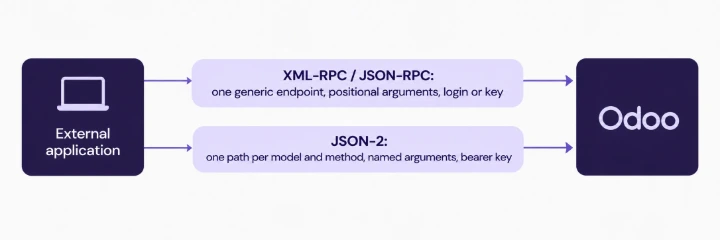
The new interface differs from the old one in a few ways that matter for a migration.
Point | XML-RPC and JSON-RPC | JSON-2 API |
|---|---|---|
Endpoint | One generic endpoint per service | One path per model and method |
Request body | Positional argument lists | Named arguments in a JSON object |
Authentication | Login and password, or password replaced by an API key | Bearer API key in the request header |
Database selection | Passed in the login call | Header, or inferred from the host name |
Transaction | Each call commits on success | Each call runs in its own transaction |
Errors | Faults returned in the protocol | Standard HTTP status codes with a JSON error body |
The last two rows deserve attention. Each JSON-2 call is its own transaction. A script that relied on several calls inside one session sharing state needs a second look.
Step 1: Find Every Integration
The first task has no code in it. Build an inventory of everything that connects to Odoo from outside.
Interview the owners. Ask finance, sales, warehouse and support teams which tools exchange data with Odoo.
Read the server logs. Web server and reverse proxy logs show requests to /xmlrpc, /xmlrpc/2 and /jsonrpc. Count calls per day and note the source address of each.
Check the API keys. Each user can create API keys in their account settings. List the keys that exist and the users behind them. A key owned by a former employee points to a forgotten script.
Search repositories and servers. Look for the strings xmlrpc, ServerProxy, execute_kw and /jsonrpc in code, scheduled jobs and automation tools.
Ask the vendors. A packaged connector for a shipping carrier, payment provider or accounting tool needs a statement from its supplier about JSON-2 support.
Record each integration with its owner, its purpose, the models it touches, its call volume and the Odoo user it logs in as.
Step 2: Classify by Risk
The risk differs from one integration to the next. Sort the inventory into three groups.
Custom scripts you control. Your team can change them. Plan the work and the test.
Packaged connectors. The supplier controls the code. Ask for the release that supports JSON-2 and the date it will arrive.
Third-party tools with no owner. Nobody can say who maintains them. These carry the highest risk, so assign an owner or plan their retirement.
Within each group, rank by business impact. A payment reconciliation job outranks a weekly report.
Step 3: Understand the Four Common Calls
Typical scripts perform four kinds of action: search and read records, create a record, update a record and delete a record. The JSON-2 equivalents follow one pattern.
A request goes to /json/2/<model>/<method> as an HTTP POST. The headers carry the API key and the content type. The body is a JSON object with the arguments of the method, named by their parameter names.
POST /json/2/res.partner/search_read
Authorization: bearer <API key>
X-Odoo-Database: <database name>
Content-Type: application/json
{
"domain": [["is_company", "=", true]],
"fields": ["name", "email"],
"limit": 5
}
The table below pairs the common XML-RPC calls with their JSON-2 form.
Action | XML-RPC pattern | JSON-2 request |
|---|---|---|
Search and read | execute_kw(db, uid, key, model, 'search_read', [domain], {fields, limit}) | POST /json/2/<model>/search_read with domain, fields, limit |
Create | execute_kw(..., 'create', [values]) | POST /json/2/<model>/create with vals_list |
Update | execute_kw(..., 'write', [ids, values]) | POST /json/2/<model>/write with ids and vals |
Delete | execute_kw(..., 'unlink', [ids]) | POST /json/2/<model>/unlink with ids |
Methods that act on existing records take an ids list in the body. Methods that act on the model as a whole, such as search_read and create, leave it out. Check the exact argument names in the documentation for your release, because they follow the method signatures of that version.
Step 4: Handle Authentication
The old interfaces let a script log in with a user name and password, or with an API key in place of the password. JSON-2 uses a bearer API key and nothing else.
One key per integration. Create a dedicated user for each integration and generate its key from that user’s account. A separate user gives the audit log a clear name and lets you revoke one integration without touching the others.
Least privilege. The key carries the access rights of its user. Give the integration user the groups it needs and no more.
Key storage. Store keys in a secrets manager or an environment variable on the server that runs the script. A key pasted into a script file ends up in version control and in backups.
Key expiry and rotation. Set an expiry on each key when Odoo’s key screen offers one, and add a rotation date to the integration inventory.
Plan check. The 19.0 documentation states that access to the JSON-2 API on Odoo Online requires the Custom plan. Confirm your plan if your database runs on Odoo Online.
Step 5: Rewrite and Test
Move one integration at a time, starting with the lowest-risk script. A migration of a single script follows five tasks.
Copy the database. Restore a recent backup to a staging server on the release you plan to upgrade to. Mask personal data during the copy.
Record the old behaviour. Run the existing script against production in read-only mode, or capture a sample of its requests and responses. The recording becomes the reference.
Rewrite the calls. Replace each XML-RPC call with its JSON-2 form. Keep the business logic in place and change the transport layer only.
Compare results. Run the new script against staging and compare the output with the recording: record counts, field values and error cases.
Test the failure paths. Send a bad key, a missing field, a record that does not exist and a value that fails validation. Check what the script does with each HTTP status it receives.
Pay special attention to three behaviours.
Transactions. A script that created an order and then its lines in several calls now commits after each call. A failure halfway leaves a partial order. Where the old script depended on a shared session, either send the whole structure in one create call with nested values or add clean-up logic for failures.
Date and time values. Check the format of date and datetime fields in requests and responses.
Large result sets. Add limit and offset to calls that read big tables, and handle each page. A call that returned ten thousand rows over XML-RPC may time out over HTTP.
Step 6: Plan the Cut-Over
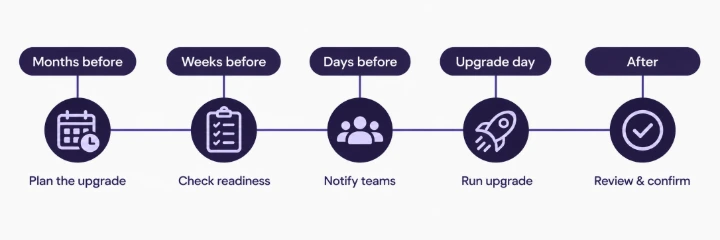
A cut-over plan covers the days around the upgrade.
When | Task |
|---|---|
Months before | Inventory complete, owners named, supplier statements received |
Weeks before | Rewritten scripts pass tests on staging, keys created, secrets stored |
Days before | Freeze changes, run the full set of integrations against the staging upgrade |
Upgrade day | Switch scripts to the new endpoints, watch logs for failed requests |
After | Keep the old scripts archived for a defined period, remove old keys and users |
Keep the two versions of each script side by side during the transition, with a setting that selects the interface. The setting allows a quick return to the old path while the database still supports it.
Common Mistakes
Missing integrations. Teams find the web shop script and miss the nightly spreadsheet loader a finance analyst built.
Shared admin keys. One powerful key serves every tool, and nobody can tell which tool made a change.
Skipping the failure tests. The happy path works on staging, and the first bad request in production exposes the gap.
Ignoring the transaction change. Partial records appear when a multi-call sequence fails midway.
Waiting for the removal date. Supplier updates, testing and approvals take longer than planned.
No logging. The new script fails silently because nobody records the HTTP status of each call.
Roles and Responsibilities
Role | Responsibility |
|---|---|
Integration owner | Inventory, risk ranking, cut-over plan |
Developer | Rewrites calls and writes tests |
System administrator | Staging server, keys, secrets, log monitoring |
Business owner of each process | Signs off the test results |
Procurement or vendor manager | Collects supplier statements on JSON-2 support |
Conclusion
Odoo documents XML-RPC and JSON-RPC as deprecated and lists JSON-2 as the interface for external applications. A migration begins with an inventory, continues with a risk ranking and ends with tested rewrites of four common calls. Authentication changes to a bearer key, and each call becomes its own transaction. A team that starts with the inventory has time for every other step.
Teams that want help with integration work can look at SSD4ME’s Odoo Custom Development services and the Enterprise Software Consulting team.
Frequently Asked Questions
It is the external API introduced in Odoo 19.0. An external application sends an HTTP POST to a path made of the model and the method, with a bearer API key in the header and the method arguments in a JSON body.
The documentation marks the old endpoints as deprecated and gives a removal schedule tied to Odoo releases. An integration keeps working on a release that still includes the endpoints. Read the schedule for the release you plan to adopt.
A dedicated user and key per integration is good practice. It gives the audit log a clear name, limits access rights and allows revocation of one integration without affecting the others.
The 19.0 documentation states that external API access on Odoo Online requires the Custom plan. Check your plan and the current documentation.
Each JSON-2 call runs in its own transaction. Where a sequence must succeed or fail as a unit, send the full structure in one call, for example a create with nested line values, or write clean-up logic that removes partial records on failure.
Name one integration owner who holds the inventory, the plan and the supplier statements. Developers and administrators carry out the tasks, and business owners sign off the tests.