
A practical guide to Odoo Online, Odoo.sh and on-premise deployment for UAE businesses
Introduction
Most Odoo projects settle the hosting question early and casually. The option the implementation partner mentioned first becomes the default, and the decision is rarely revisited until something breaks. That habit is expensive, because hosting shapes four things that matter long after go-live: how far the system can be customized, how upgrades are handled, who owns backups and recovery, and who answers when the system goes down outside office hours.
Odoo supports three deployment models. Odoo Online is a managed software-as-a-service platform. Odoo.sh is a managed platform built for customized implementations. On-premise means the business, or a provider it appoints, runs the servers. Each model suits a different kind of organization.
This guide sets out what each model provides, then walks through four questions that settle the choice for most UAE businesses. The descriptions of each model follow Odoo’s own hosting guide. Terms, limits and pricing change over time, so confirm the current position with Odoo or your implementation partner before committing.
The Three Odoo Hosting Models in Plain Terms
Odoo Online
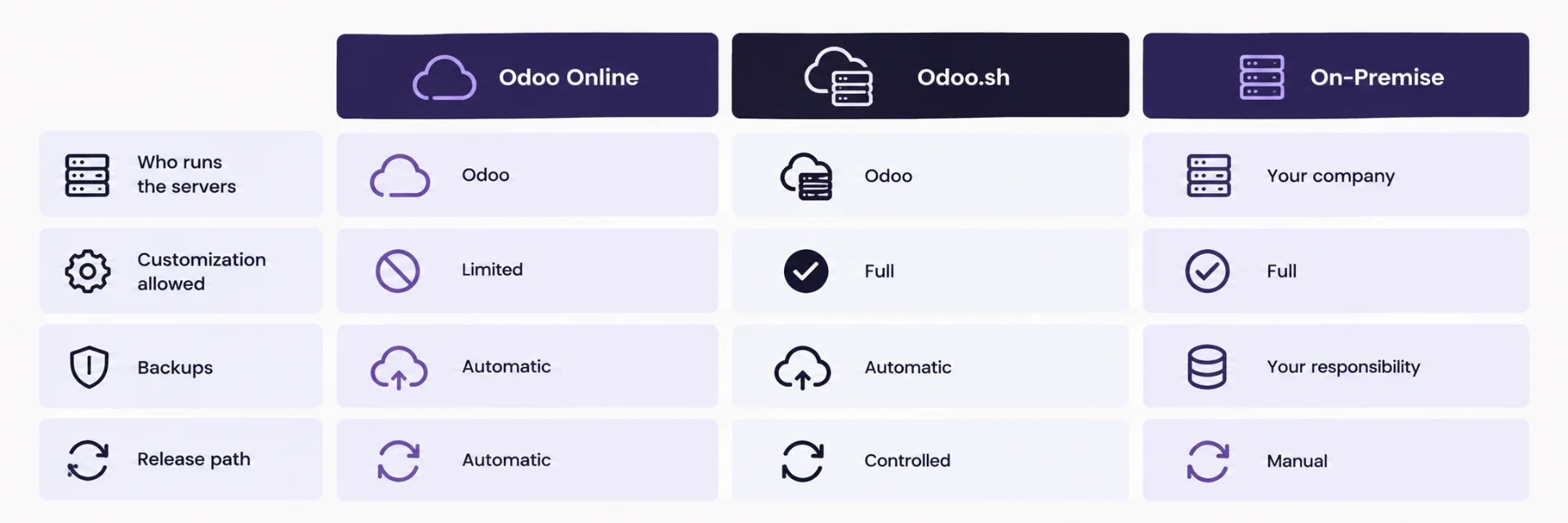
Odoo Online is the software-as-a-service option. A cloud instance is ready within minutes, and Odoo handles the technical side: monitoring, security updates and upgrades to newer releases. Odoo’s hosting guide describes a 99.9% uptime service level, excluding planned maintenance, a full daily backup of each database, and downloadable backups covering the previous three months.
Control is the trade-off. Odoo Online supports the certified apps that Odoo develops and maintains, and Odoo Studio allows no-code changes to views, reports and automated actions. Installing third-party apps or changing the source code is not permitted on Odoo Online, a restriction Odoo explains as a stability measure.
For a business running standard Odoo processes with a small IT team, that boundary rarely causes friction. For a business that needs custom modules, it settles the question immediately.
Odoo.sh
Odoo.sh is a platform-as-a-service managed by Odoo and designed for customized implementations. It supports certified apps and third-party apps from the Odoo apps store. It also adds developer tooling: integration with a Git repository, an online editor, continuous integration, development and staging environments, branch management and automated testing of every new commit. The same 99.9% uptime service level applies, and daily backups are kept in separate data centers.
The practical benefit is a managed environment with a proper release path. Changes move from a development branch to staging and then to production, and the team chooses the number of workers, the storage and the number of staging environments as needs change.
On-Premise
On-premise means the business runs Odoo on its own infrastructure, or on servers operated by a third-party provider. It offers the widest freedom: any app, any configuration, full control of the server. Odoo notes that it cannot provide a service level covering the robustness, performance or scalability of infrastructure it does not run, and it recommends this model for organizations with advanced technical knowledge or a trusted local partner. The business becomes responsible for security patches, backups, disaster recovery, monitoring and capacity.
Question 1: How Much Control Does IT Need Over the Server?
Start with customization, because it removes options fastest. If the business expects custom modules, third-party apps or changes to Odoo’s source code, Odoo Online is out and the choice narrows to Odoo.sh or on-premise. If the plan is standard Odoo with configuration and Studio, all three models remain open.
Other control requirements matter too. Some organizations must keep particular software on the server, connect it to internal networks, or follow security policies that restrict managed platforms. Write these requirements down before looking at pricing. A requirement missing from the list at the start tends to reappear as an expensive exception during the project.
Question 2: How Predictable Is the Usage Load?
Load decides how much capacity planning the team has to do. A business with steady daily use can size a server with confidence. A business with sharp peaks, such as month-end closing, a seasonal sales period or a bulk import that runs overnight, needs headroom that sits idle for most of the month.
On managed platforms, capacity is adjusted through the platform. On-premise, the team buys or reserves capacity for the busiest day, then pays for it every day. Estimate the peak honestly: the number of concurrent users at month-end, the volume of transactions on the heaviest day and the size of the largest scheduled job. A hosting choice that handles an average Tuesday and slows down on the last working day of the quarter will be remembered for the wrong reasons.
Question 3: What Does an Hour of Downtime Cost?
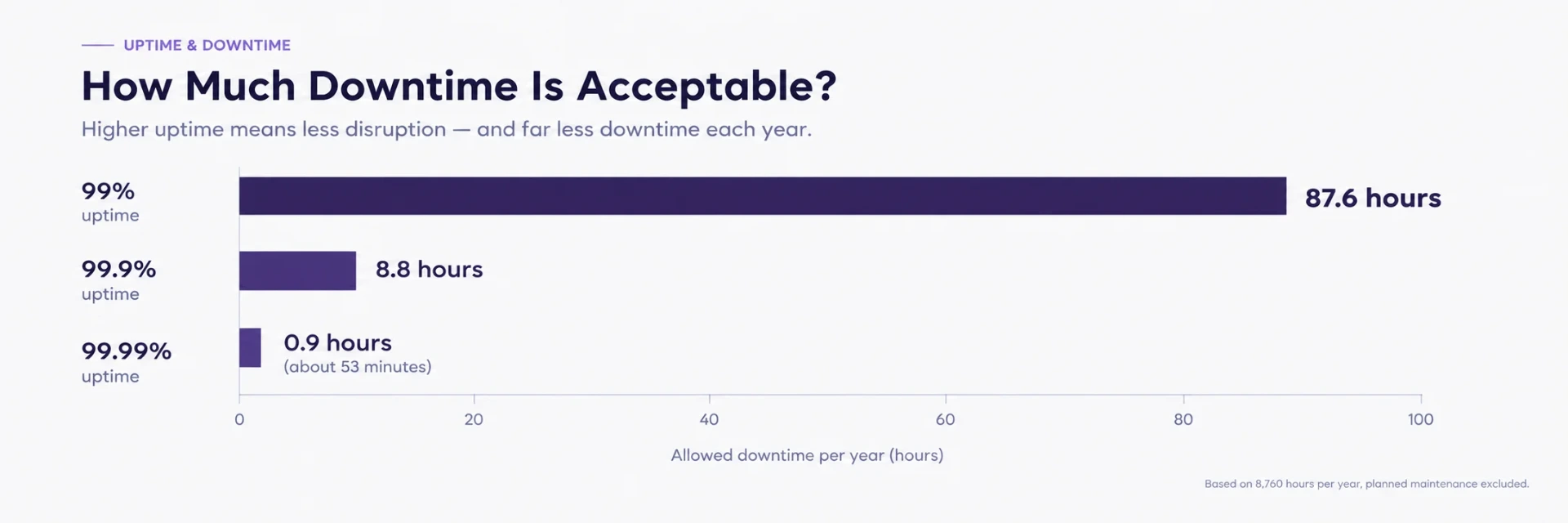
A 99.9% uptime commitment sounds close to perfect. Over a year of 8,760 hours, it allows about 8.8 hours of unavailability, and planned maintenance sits outside the figure. Whether that is acceptable depends on what an hour of downtime costs the business.
Work it out for the hours that matter most. Count the sales or invoices that cannot be processed, the warehouse or field staff who wait, the support queries that pile up and the delay to anything that depends on the system, such as payment runs. Many businesses find that the cost of an hour differs sharply between a quiet Sunday afternoon and the first week of the month.
If the figure is high, the questions that follow concern recovery. How fast can service be restored? Where do backups live? When was the restore process last tested?
Question 4: Who Is Accountable When Something Breaks at 2am?
Hosting models differ most on this question. On Odoo Online and Odoo.sh, Odoo operates the platform and carries the uptime commitment. Application problems, such as a failed custom workflow or a misconfigured automation, still belong to the business and its implementation partner. On-premise, the whole stack belongs to the business: server, database, backups, security and the application on top of them.
Odoo’s own guidance lists the questions to put to any provider that hosts Odoo on-premise:
What is the guaranteed uptime, and how does it scale as users, apps and data grow?
What is the disaster recovery policy?
How and when can backups be downloaded, and what is the data policy?
What kind of test environment is provided?
Who maintains and upgrades third-party apps?
Put the answers in writing and name one person on the business side who owns the relationship. A question left unanswered at selection becomes a dispute later.
Comparing the Total Cost Over Three Years
Licence price is the visible number. The total depends on what surrounds it. For a three-year comparison, list these items for each model:
Platform or server cost, including staging and test environments
Staff time for patching, backups, monitoring and upgrades
The cost of recovery tests and disaster recovery arrangements
Development effort lost to restrictions, such as a custom feature that has to be rebuilt on another platform
The cost of downtime, using the figure from Question 3
On-premise often looks cheapest on a monthly invoice because staff time and risk do not appear on it. Odoo Online can become the costly choice for a business that later needs a custom module, because moving to another model becomes a project of its own. A comparison that includes all five items gives a fairer picture than the license line.
A Simple Decision Guide
Odoo Online suits a business running standard Odoo processes, with no custom modules planned and a small IT team that prefers a fully managed platform.
Odoo.sh suits a business that expects custom modules or third-party apps and wants a managed platform with staging and a proper release path.
On-premise suits a business with specific control, network or policy requirements and the skills, or a trusted provider, to run the full stack.
These are starting points. The four questions above settle the exceptions.
Switching Later
A hosting decision can be reversed, though not for free. Odoo’s guide states that migrating from one platform to another is always an option, that the complexity depends on the origin and the destination, and that Odoo offers the migration at no charge in some cases. Planning for a possible move helps. Keep custom code in version control, document every module and keep a recent restore test on file. A business that does those three things can change platform without starting over.
Checklist Before You Sign
A written list of customization needs for the next two years.
A peak-load estimate for month-end and the busiest season.
The cost of one hour of downtime for the three most critical processes.
The backup location, the backup frequency and the date of the last successful restore test.
A named owner for hosting incidents on the business side.
Written answers to the five provider questions above, for any on-premise or provider-hosted option.
Conclusion
The right hosting model is the one whose limits the business can live with. Odoo Online offers simplicity within boundaries, Odoo.sh offers managed flexibility for customized systems, and on-premise offers full control with full responsibility. Four questions, answered with real numbers and named owners, turn a default into a decision.
Teams planning a new Odoo implementation or reviewing an existing one can look at SSD4ME’s Odoo ERP Implementation and Cloud Hosting services, and at Infrastructure Solutions for the supporting environment.
Frequently Asked Questions
Odoo Online, a software-as-a-service platform managed by Odoo; Odoo.sh, a platform-as-a-service managed by Odoo for customized implementations; and on-premise, where the business or its provider runs the servers.
According to Odoo’s hosting guide, installing third-party apps or changing the source code is not permitted on Odoo Online. Odoo Studio supports no-code customization. Custom modules need Odoo.sh or an on-premise deployment.
Across a year of 8,760 hours, it allows about 8.8 hours of unavailability, with planned maintenance excluded. Estimate the cost of an hour of downtime to judge whether that level is acceptable for the business.
On Odoo Online and Odoo.sh, Odoo performs daily backups and keeps them available for download for up to three months, according to its hosting guide. On-premise, the business or its hosting provider owns backups, including restore tests.
Yes. Migration between platforms is always an option. Complexity depends on the starting point and the destination, and Odoo offers some migrations at no charge. Version-controlled code, documented modules and a recent restore test make a later move easier.
Odoo Online usually fits standard processes, and Odoo.sh fits a business that plans customization and still wants a managed platform. On-premise calls for advanced technical skills or a trusted provider.