
Introduction
The appointment deadline of 30 October has passed. For many businesses in scope, a provider is now named and a contract is signed. A finance director may feel the main task is complete.
The next question arrives quickly. Can the company show that its ERP produces invoices in the required format, delivers them through the provider and handles the cases that break a simple flow? A signed contract answers none of those points. A folder of dated test results answers all of them.
This guide describes what that folder should hold. It draws on the Ministry of Finance material on the UAE electronic invoicing programme, including Ministerial Resolution 66 of 2026 and the programme overview, and it sets out a four-step plan: understand the model, build the test set, run it and keep the proof. The Ministry updates its guidance, so confirm each point against the current version before you rely on it. This guide uses no dates beyond the 30 October appointment deadline, and your own revenue band and timeline come from the Ministry’s published material.
How the UAE Model Works
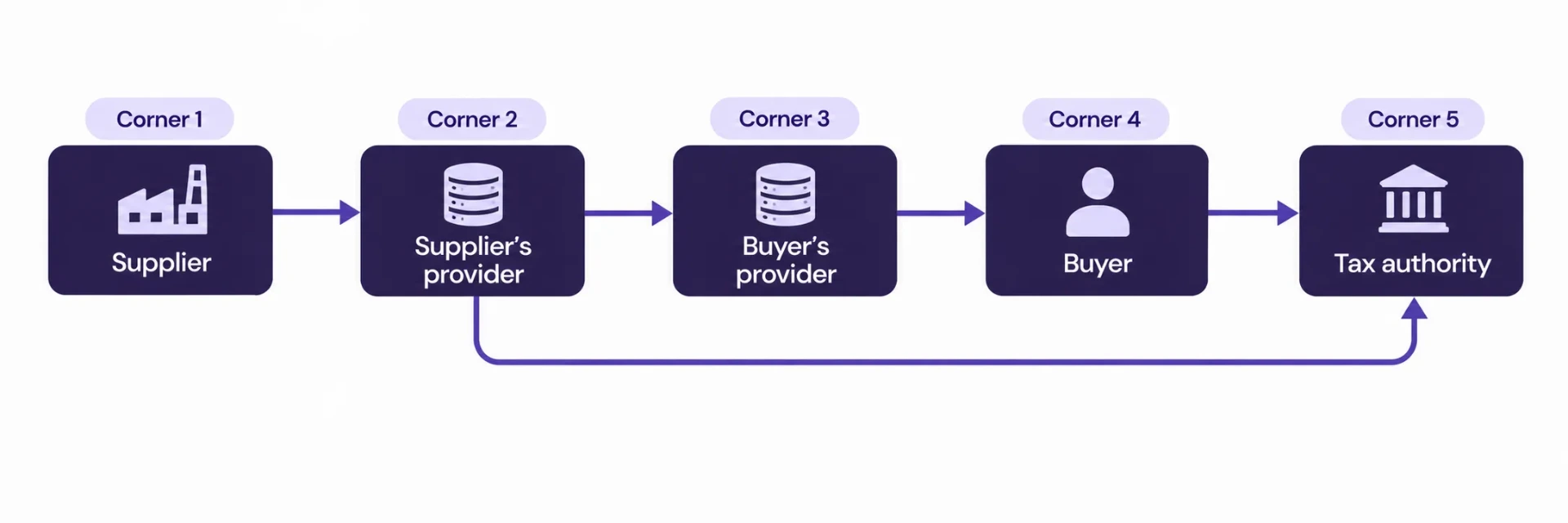
The programme uses a decentralised model often described as a five-corner model. Four of the corners carry the invoice and one carries the data to the tax authority.
Corner | Role |
|---|---|
Corner 1 | The supplier, who issues the invoice from its ERP |
Corner 2 | The supplier’s accredited service provider |
Corner 3 | The buyer’s accredited service provider |
Corner 4 | The buyer, who receives the invoice in its ERP |
Corner 5 | The tax authority, which receives the tax data from the service providers |
The supplier does not send an invoice straight to the buyer. The ERP passes the data to the accredited service provider, which validates it, wraps it in the required format and sends it through the network to the buyer’s provider. Each provider also reports the relevant data to the tax authority.
Two features matter for testing.
Structured format. The invoice is an XML file that follows the national data standard, referred to in the programme material as PINT-AE. A PDF alone does not meet the requirement. The XML is the invoice.
Document types. The programme covers tax invoices and related documents such as credit notes. Each type carries its own rules, so each needs its own tests.
Because the model has two providers, a test needs to cover the supplier side and the buyer side. A business is usually both.
Step 1: Understand What You Must Prove
Test evidence serves three audiences, and each asks a different question.
Finance and management. Can we issue and receive invoices on the day the programme applies to us?
Auditors. Did the company test the process, and does the record show who tested what and when?
The tax authority. If a question arises about a document, can the company show how it was created, sent and stored?
The evidence has to answer all three. A screenshot of one successful invoice answers the first question for a single case and says nothing about the other two.
Step 2: Build the Test Set
A test set is a list of invoices and events that covers the ways the business actually trades. Start from your own sales and purchase history, because it shows what really happens.
Supplier side (issuing)
Test case | What it checks |
|---|---|
Standard tax invoice, one line, standard rate | Basic mapping from ERP fields to the XML |
Invoice with several lines and mixed tax treatments | Line-level tax calculation and totals |
Invoice with a discount at line level and at document level | Rounding and total consistency |
Invoice to a buyer outside the UAE | Handling of buyer data and tax treatment |
Credit note linked to an earlier invoice | Reference to the original document |
Invoice in a foreign currency | Currency and exchange rate fields |
Invoice with missing or invalid buyer tax number | Rejection by the provider and the message returned |
Invoice cancelled or corrected after issue | The correction route your process uses |
Buyer side (receiving)
Test case | What it checks |
|---|---|
Valid invoice received from a supplier’s provider | Import into purchasing and accounting |
Invoice with a different tax treatment than the purchase order | Matching exceptions |
Credit note received | Posting against the original bill |
Invoice received twice | Duplicate detection |
Invoice rejected by the buyer | The route and the record of rejection |
Aim for one case in each row to start, and add cases for any trading pattern the table does not cover: recurring subscriptions, advance payments, intercompany sales, or sales through a point-of-sale system.
Step 3: Run the Tests
Run the test set in the environment your provider offers for testing, using a copy of the ERP configured as production will be. Work through five checks on each case.
Source data. Record the ERP document: number, date, customer, lines, taxes, totals. A screenshot or an export is enough, if it carries the date.
Generated XML. Save the file the ERP or the connector produced. Open it and check that the key values match the source data.
Provider response. Save the validation result and any error codes. For a rejected case, the message is the evidence.
Delivery status. Record whether the document reached the buyer’s side and the status the provider shows.
Posting on the other side. For buyer-side tests, record the resulting vendor bill in the ERP and its link to the original XML.
Treat every failure as a finding. Write down the cause, the fix, and the date of the successful rerun. A log with failures and fixes shows a real test. A log with only successes raises questions.
Mapping Problems to Look For
Teams meet the same problems again and again. Check these first.
Tax registration numbers. Missing, wrongly formatted or stored in a free-text field.
Units of measure. Internal units that do not map to the codes the format expects.
Rounding. Line totals and document totals that differ by a small amount.
Customer master data. Missing addresses or legal names for buyers.
Item codes and descriptions. Descriptions that exceed field lengths or contain characters the XML rejects.
Document references. A credit note that lacks a pointer to the original invoice.
These are mainly data quality issues in the ERP, and they can be fixed before go-live at low cost.
Step 4: Keep the Proof
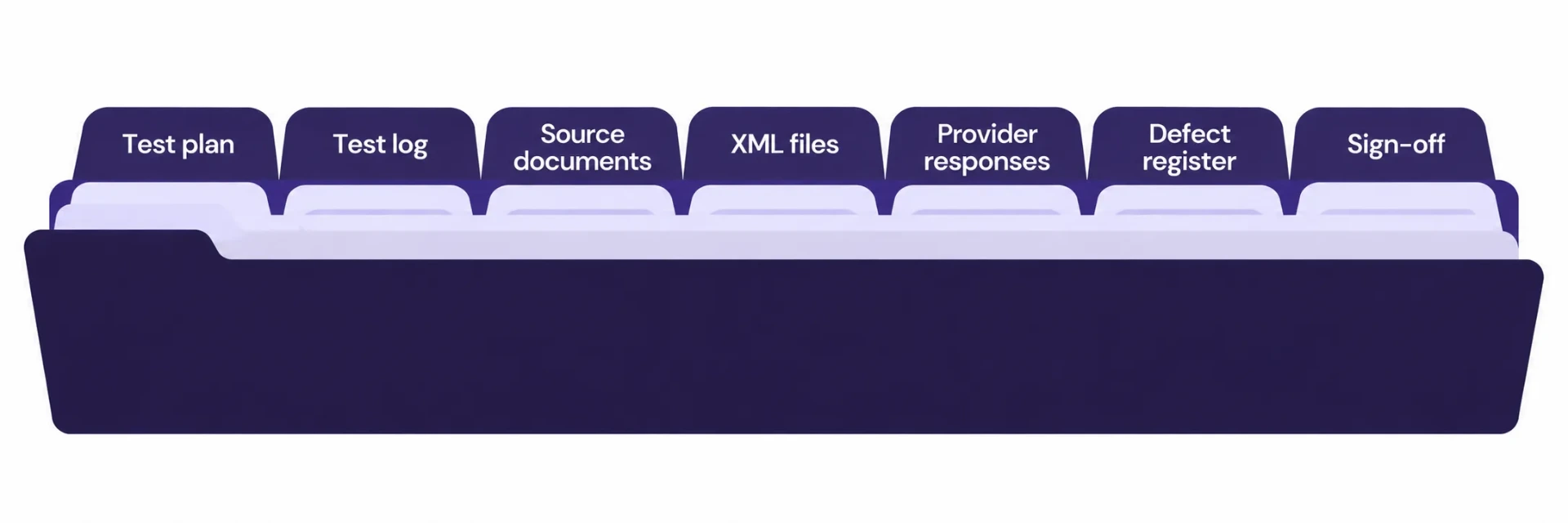
Store the evidence where an auditor can find it and where it cannot be altered casually.
Item | Content |
|---|---|
Test plan | The list of test cases and their purpose |
Test log | Case number, date, tester, result, defects found, rerun date |
Source documents | ERP exports or screenshots with dates |
XML files | The generated and received files |
Provider responses | Validation results and delivery statuses |
Defect register | Issue, cause, fix, owner, status |
Sign-off | Names and dates of finance and IT approval |
Give the folder a named owner and a clear structure: one subfolder per test cycle, one file per case. Check the Ministry’s current guidance on how long invoices and related records must be kept and in what form, because the retention rules are in the programme documents and may have been updated since the overview was issued.
What to Ask Your Provider
The contract and the onboarding call should answer these points. Put the answers in writing.
Which environment is available for testing, and how long will it stay open?
How does the ERP connect: an API, a file exchange or a prebuilt connector?
Which validation rules does the provider apply, and where is the list?
What is the process when a document is rejected, and how fast is the response?
How are corrections and credit notes handled?
Which logs and reports can the finance team download?
What happens to the data if the company changes provider?
A provider that answers these clearly makes testing easier. Vague answers are a risk to record and escalate.
Roles and Responsibilities
Role | Responsibility |
|---|---|
Finance director | Owns the programme timeline and signs off the evidence |
Tax lead | Confirms tax treatment of each case against Ministry guidance |
ERP administrator | Configures the ERP, the connector and test data |
Developer | Fixes mapping defects and supports the XML checks |
Accounts receivable and payable leads | Run supplier-side and buyer-side cases |
Internal audit | Reviews the evidence folder |
Common Mistakes
Testing only the happy path. One clean invoice proves little.
Ignoring the buyer side. The company receives invoices too, and the import path needs the same care.
Fixing data in the test copy only. The same defect then appears in production master data.
No dates on the evidence. An undated screenshot carries little weight.
Treating the provider test as the company test. The provider tests its own platform, and the company tests its own data and process.
Using old guidance. The Ministry updates its documents, so check the version on every review.
Conclusion
The appointment of a provider on or before 30 October starts the work. The programme uses a five-corner model with an accredited provider on each side, a structured XML invoice and its own rules for each document type. Evidence that the company can issue and receive those documents consists of a test plan, dated results, saved files, a defect register and a sign-off. A finance team that builds the folder now holds an answer for its management, its auditors and the authority.
Teams that want help connecting an ERP to a service provider can look at SSD4ME’s Odoo ERP services and the Enterprise Software Consulting team.
Frequently Asked Questions
It is the decentralised model in the Ministry of Finance programme material. The supplier and the buyer each work through an accredited service provider, and the providers report the tax data to the authority.
The programme requires a structured electronic invoice in XML that follows the national data standard. A PDF copy may accompany it for human readers, and the XML is the document that counts.
It is the name used in the programme material for the national invoice data standard, which defines the fields and rules of the XML.
Cover each document type that applies to your business, including tax invoices and credit notes, and each trading pattern you use, such as foreign currency, export sales and advance payments.
Yes. Almost every business also buys, and received invoices must enter purchasing and accounting. Test the import path and the handling of rejected and duplicate documents.
Keep it at least until the programme is stable in your operations and your auditors have reviewed it. For the retention period of invoices themselves, follow the Ministry’s current guidance.