
Introduction
Custom code outlives the person who wrote it. The developer who built a module moves to another project, leaves the company, or simply forgets the details after eighteen months. Then a new developer opens a module with forty files and has to answer questions that nobody wrote down. Why does this override exist? Which standard behavior does it change? Who asked for it? Does the business still need it?
Without answers, every change starts with guesswork. Each edit risks breaking something that only the original author understood, and each upgrade costs more than planned because every module has to be read from scratch.
The remedy is small. One page per custom module, kept next to the code and updated whenever the code changes, answers most of those questions. This guide sets out what the page should contain, where to keep it and how to keep it current.
Why Undocumented Customization Becomes a Cost
The cost of missing documentation arrives in four places, usually at the worst moment.
Onboarding. A new developer spends the first weeks reading code to learn what the system does. A short record per module turns that reading into a first day of orientation.
Changes. An override of a standard method can affect screens, reports and automations that the author never listed. Without a record of what each module changes, every edit needs a wide manual check.
Upgrades. Moving to a newer Odoo version means reviewing every custom module against the new release. Without a register of what each module touches, the review starts by reading all the code.
Forgotten duplicates. Standard Odoo adds features with each release. A custom module written for a gap that the standard product now fills often stays in place because nobody remembers why it exists, and it carries maintenance cost for no benefit.
Start With the Manifest
Every Odoo module declares itself in a file called __manifest__.py. According to Odoo’s developer documentation, the manifest declares a Python package as an Odoo module and holds its metadata in a single dictionary. It is the first thing a new developer opens, so it should be complete and accurate.
The fields that matter most for documentation:
name: the human-readable name of the module.
version: the module’s version, which Odoo’s documentation says should follow semantic versioning rules. Increase it with every change, so the version tells a reader how far the module has moved since they last looked at it.
description: an extended description, written in reStructured Text. Two to four sentences stating the purpose in business terms are enough.
author, website and license: who maintains the module and under which license it is distributed.
category: the rough business domain of the module.
depends: the modules that must be loaded before this one. Odoo’s documentation explains that a dependency exists either because the module uses features the other module creates, or because it alters resources the other module defines. The list is therefore a first map of what the module touches, so keep it accurate: add anything missing and remove anything unused.
application: whether the module is a fully fledged application or a technical module that adds functionality to an existing one.
A manifest filled in with care takes ten minutes and already answers who, what and which version. The one-page record covers the rest.
The One-Page Record: Ten Fields
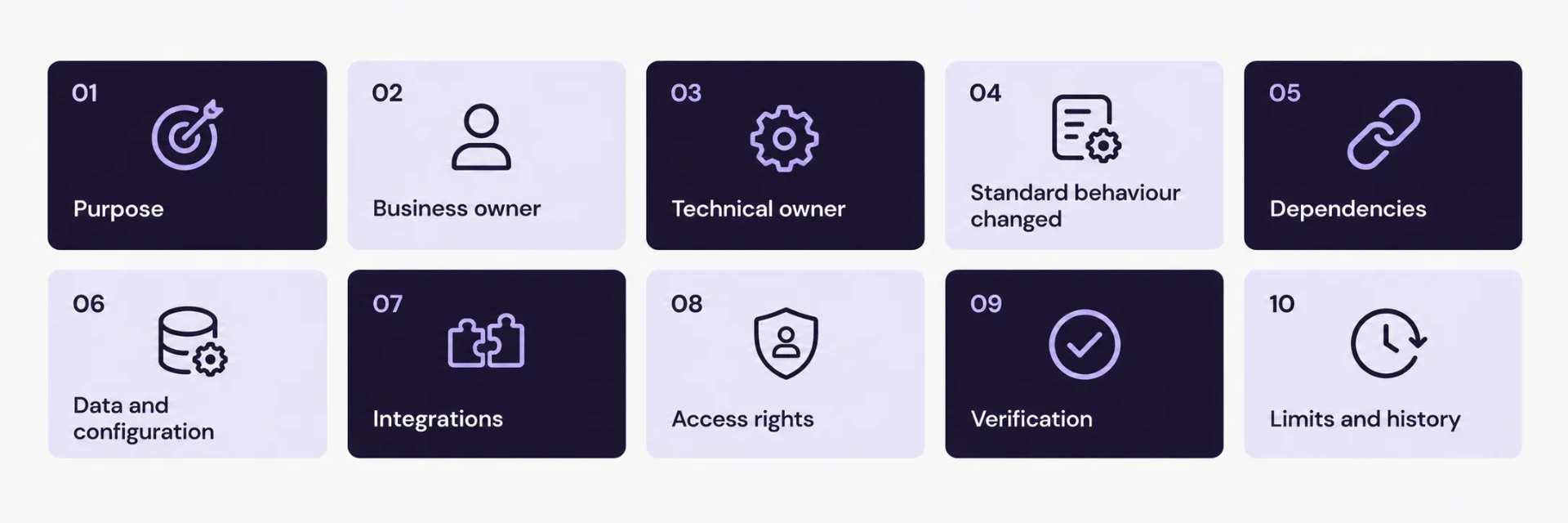
A useful record is short enough that people keep it current. Ten fields cover what a developer or reviewer needs.
Purpose. One sentence, in business terms, saying what the module does.
Business owner. The person or team who asked for it and can say whether it is still needed.
Technical owner. The developer or team responsible for changes.
Standard behavior it changes. The models extended, the views inherited and the methods overridden, listed by name.
Dependencies. The Odoo apps and other custom modules it relies on, with a line on why.
Data and configuration. Settings, default data, scheduled actions, automated actions, email templates and reports that the module installs or requires.
Integrations. External systems it reads from or writes to, the endpoints used, where credentials are stored (never the credentials themselves) and what happens when the other system is unavailable.
Access rights. The security groups and record rules it adds or relies on.
Verification. The steps, or automated tests, that confirm it works after a change, with sample data.
Known limits and history. What the module does not cover, and a short changelog tied to Odoo versions.
Field 4 deserves the most care. It is the field that turns an upgrade review from a code reading exercise into a targeted check.
A Short Example
The record below is a sample for an imaginary module. It shows the level of detail that works.
Module: delivery_note_approval
Purpose: Requires a warehouse supervisor to approve delivery notes above an agreed value before goods leave the warehouse.
Business owner: Head of Operations. Technical owner: ERP development team.
Standard behavior changed: Adds an approval status to the delivery order model, overrides the validate action to check the status, and adds an Approve button to the delivery order form view.
Dependencies: Inventory, Sales. Depends on the custom module approval thresholds for the value limits.
Data and configuration: Installs one email template for approval requests and one scheduled action that reminds approvers after 24 hours.
Integrations: None.
Access rights: Adds the group Warehouse Supervisor. Only this group can approve.
Verification: Create a delivery order above the limit, confirm that validation is blocked, approve it as a supervisor, then confirm validation succeeds.
Known limits and history: Does not handle partial deliveries. Version 1.2 added the reminder action. Tested on Odoo 18.
A reviewer reading this page knows within two minutes what the module changes, who to ask about it and how to test it.
Where to Keep the Record
Three places work together.
Next to the code. Keep a README file in each module folder. When the code changes, the record changes in the same pull request, and the reviewer can see both together. A record stored far from the code drifts out of date within a few releases.
In a shared register. Keep one table that lists every custom module with its purpose, business owner, technical owner, the Odoo version it was last tested on and the date of its last review. The register is the starting point for upgrade planning and for audits.
In the knowledge base. Publish a short business-facing summary for each module: what it does, who owns it and where to ask questions. Non-developers can then find answers without opening the repository.
Record the Reason Behind Each Change
Behavior can be read from code. The reason cannot. For each module, add a short note on why custom code was chosen: what problem it solves, which alternatives were considered, such as standard configuration, Odoo Studio or an existing app, and why each was set aside. Link the original request or ticket.
That note is what lets a future team judge whether a module is still needed. When a new Odoo release adds a feature that covers the same need, the reviewer can compare the original problem with the new feature and decide whether to retire the module.
Keep It Current
A record that is out of date misleads more than having none. Four habits keep it accurate.
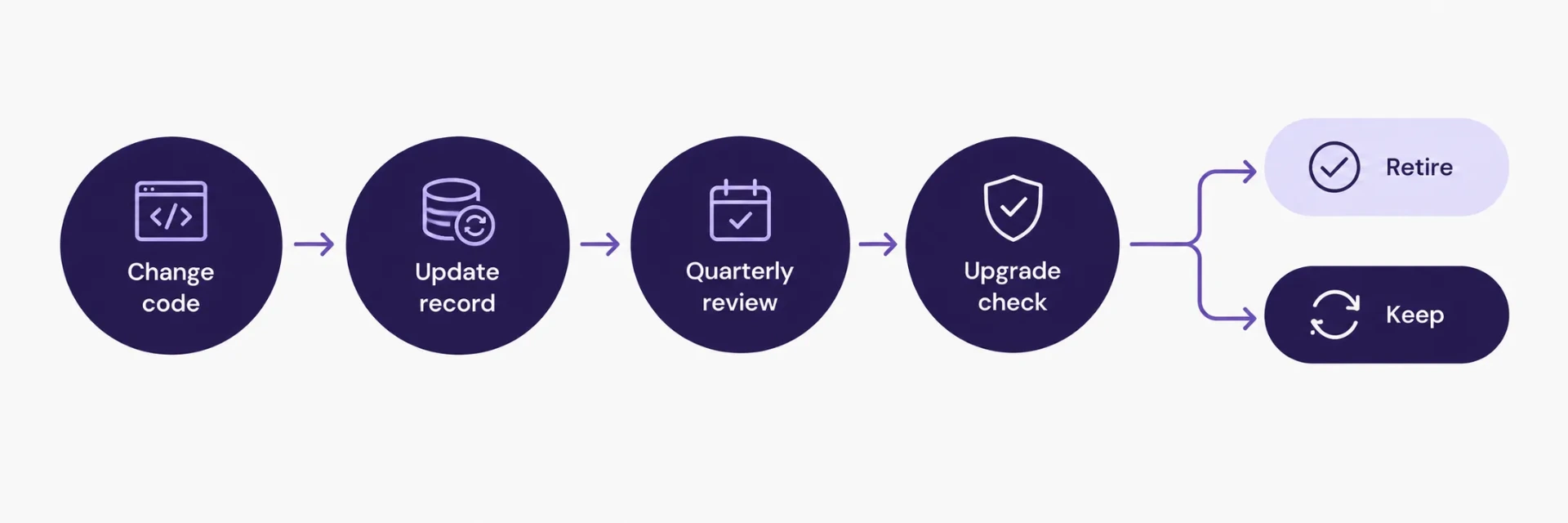
Make the record part of the definition of done. A change to a module is complete when its record and its version number are updated.
Review the register every quarter. Each business owner confirms whether their modules are still needed, and each technical owner confirms the records match the code.
Compare modules with the standard product at every upgrade. Before migrating, check each custom module against the native features of the new version. Retire modules that duplicate standard features and record the decision.
Archive records of retired modules. Keep the reason for retirement, because the same request tends to return.
A First-Week Test
A simple test shows whether the records work. Ask a developer who is new to the project to read three records, then explain what each module does and propose a small change. Every question they have to ask a colleague points to a field that is missing or unclear. Add the missing detail, and repeat the test a quarter later with another newcomer.
What the Record Saves at Upgrade Time
Upgrade planning starts from the register. It lists every custom module, the version each was tested on and the standard behavior each one changes. Reviewers can go straight to the models, views and methods named in field 4 of each record, check them against the new release and plan the retest around them.
The same material shortens estimates. A team that knows which modules change core behavior, which only add data and which only add reports can size the upgrade with far less margin for surprise.
Conclusion
Documentation for custom Odoo modules does not need a large project. A complete manifest, a one-page record with ten fields, a shared register and a quarterly review give every developer, reviewer and business owner the same starting point. Changes become safer, upgrades become easier to estimate, and modules that no longer earn their place can be retired with confidence.
Teams that want a second pair of eyes on an existing set of customizations can review SSD4ME’s Odoo Custom Development and Enterprise Software Consulting services.
Frequently Asked Questions
It is the file __manifest__.py that declares a Python package as an Odoo module and holds its metadata in a single dictionary, including the name, version, description, author, licence, category and dependencies. Odoo’s developer documentation lists the available fields.
One page. Ten fields cover purpose, owners, standard behaviour changed, dependencies, data and configuration, integrations, access rights, verification, known limits and history. A short record gets updated, and a long one gets ignored.
Next to the code, as a README in the module folder, so changes to the module and its record go through the same review. Add a shared register of all modules and a short business-facing summary in the knowledge base.
Each module needs a technical owner who keeps the record accurate and a business owner who confirms the module is still needed. Record both names in the register.
Review the register every quarter, and compare every custom module with the standard product of the new version at each Odoo upgrade. Update a module’s record whenever its code changes.
The register shows which modules exist and what standard behaviour each one changes. Reviewers can check those areas directly against the new release, retire modules that duplicate standard features and size the retest accurately.